# Push Button
> A big arcade-style push button for puzzle rooms and party games: a glossy domed cap in a chrome bezel, set into a round housing on a bolted hazard-yellow floor plate. Toggle the pressed state to sink the cap and light it up; button color and size are adjustable.
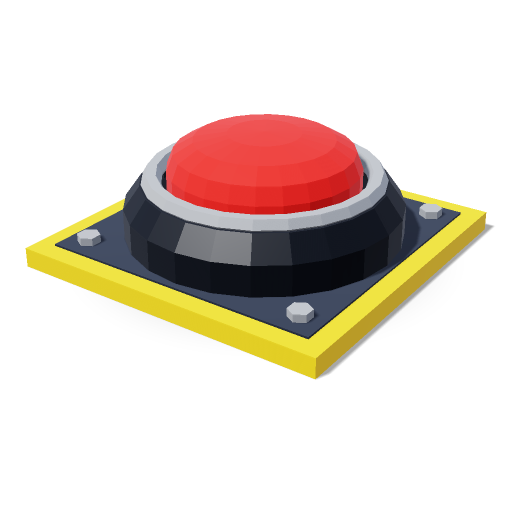
Multi-view sheet (3/4, front, side, top): https://codels.download/m/push-button.sheet.png
## Facts
- Category: Game Kit › Interactive
- Size (W × H × D): 1.00 × 0.38 × 1.00 m — units are meters, +Y up, front faces +Z
- Origin: center of the base (y = 0)
- Triangles: 984 · Meshes: 9 · Materials: 5
- License: CC0-1.0 (Codels built-in)
- Tags: arcade, button, pressure-plate, switch, cartoon, low-poly, stylized, sci-fi, adventure, party-game, platformer, puzzle, interactable, metal, plastic, round, emissive, game-ready, mobile-friendly, parametric, color-gray, color-yellow, size-medium, poly-low
- Page: https://codels.download/models/push-button
## Files
| Format | URL |
|---|---|
| three.js ES module (`createPushButton()`) | https://codels.download/m/push-button.js |
| React Three Fiber component (``) | https://codels.download/m/push-button.jsx |
| Instancing module (`createPushButtonInstances(count, place)`, one draw call per material) | https://codels.download/m/push-button.instanced.js |
| Standalone HTML demo | https://codels.download/m/push-button.html |
| glTF binary | https://codels.download/m/push-button.glb |
| glTF binary, Meshopt-compressed (2–3× smaller; GLTFLoader needs `setMeshoptDecoder(MeshoptDecoder)`) | https://codels.download/m/push-button.glb?compress=meshopt |
| glTF JSON | https://codels.download/m/push-button.gltf |
| OBJ (vertex colors) + MTL | https://codels.download/m/push-button.obj · https://codels.download/m/push-button.mtl |
| STL | https://codels.download/m/push-button.stl |
| CodelSpec JSON | https://codels.download/m/push-button.json |
## Parameters
Append them as query parameters to any URL above to get a customized variant (e.g. `?color=...`).
| Param | Type | Range / options | Default | Current |
|---|---|---|---|---|
| `color` | color | #rrggbb | #e8322f | #e8322f |
| `pressed` | boolean | true \| false | false | false |
| `size` | number | 0.5 – 2 | 1 | 1 |
## Parts
- pushButton (group)
- plate (box · hazard)
- plateInset (box · plate)
- housing (lathe · housing)
- bezel (torus · chrome)
- cap (lathe · cap)
## How to use
Save the code below as `push-button.js`, then:
```js
import { createPushButton } from './push-button.js';
const model = createPushButton();
scene.add(model);
```
## Code
```js
/**
* Push Button — Codels 3D model library (https://codels.download/models/push-button)
* License: CC0-1.0 · Units: meters · Y-up · Front: +Z · Origin: center of the base (y = 0)
* Triangles: 984 · Size (W × H × D): 1.00 × 0.38 × 1.00 m
*
* Usage:
* import { createPushButton } from './push-button.js';
*
* const model = createPushButton();
* model.position.set(0, 0, 0);
* scene.add(model);
*/
import * as THREE from 'three';
const deg = THREE.MathUtils.degToRad;
// Revolve a 2D profile [[radius, y], ...] around the Y axis.
function lathe(points, segments, phiStart = 0, phiLength = Math.PI * 2) {
return new THREE.LatheGeometry(points.map(([x, y]) => new THREE.Vector2(x, y)), segments, phiStart, phiLength);
}
export function createPushButton() {
const root = new THREE.Group();
root.name = 'PushButton';
// Materials
const plateMat = new THREE.MeshStandardMaterial({ name: 'plate', color: 0x363c48, roughness: 0.65, metalness: 0.3, flatShading: true });
const hazardMat = new THREE.MeshStandardMaterial({ name: 'hazard', color: 0xf2c12e, roughness: 0.6, flatShading: true });
const housingMat = new THREE.MeshStandardMaterial({ name: 'housing', color: 0x23272f, roughness: 0.5, metalness: 0.3, flatShading: true });
const chromeMat = new THREE.MeshStandardMaterial({ name: 'chrome', color: 0xd7dde6, roughness: 0.2, metalness: 0.85, flatShading: true });
const capMat = new THREE.MeshStandardMaterial({ name: 'cap', color: 0xe8322f, roughness: 0.25, flatShading: true });
// Shared geometries
const cylinderGeo = new THREE.CylinderGeometry(0.035, 0.035, 0.03, 6);
// Parts
const pushButton = new THREE.Group();
pushButton.name = 'pushButton';
root.add(pushButton);
const plate = new THREE.Mesh(new THREE.BoxGeometry(1, 0.06, 1), hazardMat);
plate.name = 'plate';
plate.position.set(0, 0.03, 0);
pushButton.add(plate);
const plateInset = new THREE.Mesh(new THREE.BoxGeometry(0.88, 0.012, 0.88), plateMat);
plateInset.name = 'plateInset';
plateInset.position.set(0, 0.06, 0);
pushButton.add(plateInset);
const cylinder4 = new THREE.Mesh(cylinderGeo, chromeMat);
cylinder4.position.set(-0.37, 0.075, -0.37);
pushButton.add(cylinder4);
const cylinder5 = new THREE.Mesh(cylinderGeo, chromeMat);
cylinder5.position.set(0.37, 0.075, -0.37);
pushButton.add(cylinder5);
const cylinder6 = new THREE.Mesh(cylinderGeo, chromeMat);
cylinder6.position.set(0.37, 0.075, 0.37);
pushButton.add(cylinder6);
const cylinder7 = new THREE.Mesh(cylinderGeo, chromeMat);
cylinder7.position.set(-0.37, 0.075, 0.37);
pushButton.add(cylinder7);
const housing = new THREE.Mesh(lathe([[0, 0.06], [0.42, 0.06], [0.42, 0.16], [0.37, 0.23], [0.33, 0.23], [0.33, 0.18], [0, 0.18]], 24), housingMat);
housing.name = 'housing';
pushButton.add(housing);
const bezel = new THREE.Mesh(new THREE.TorusGeometry(0.335, 0.03, 6, 24), chromeMat);
bezel.name = 'bezel';
bezel.position.set(0, 0.235, 0);
bezel.rotation.set(deg(90), 0, 0);
pushButton.add(bezel);
const cap = new THREE.Mesh(lathe([[0, 0.19], [0.29, 0.19], [0.29, 0.27], [0.27, 0.32], [0.21, 0.355], [0.11, 0.373], [0, 0.377]], 24), capMat);
cap.name = 'cap';
pushButton.add(cap);
root.traverse((o) => {
if (o.isMesh) {
o.castShadow = true;
o.receiveShadow = true;
}
});
return root;
}
export default createPushButton;
```
---
Codels — 3D models as code for three.js. Search more: https://codels.download/api/v1/models?q= · Guide: https://codels.download/llms.txt